Singapore Visa Photo Size: 35 × 45 mm, 400 × 514 Pixels, Under 60 KB
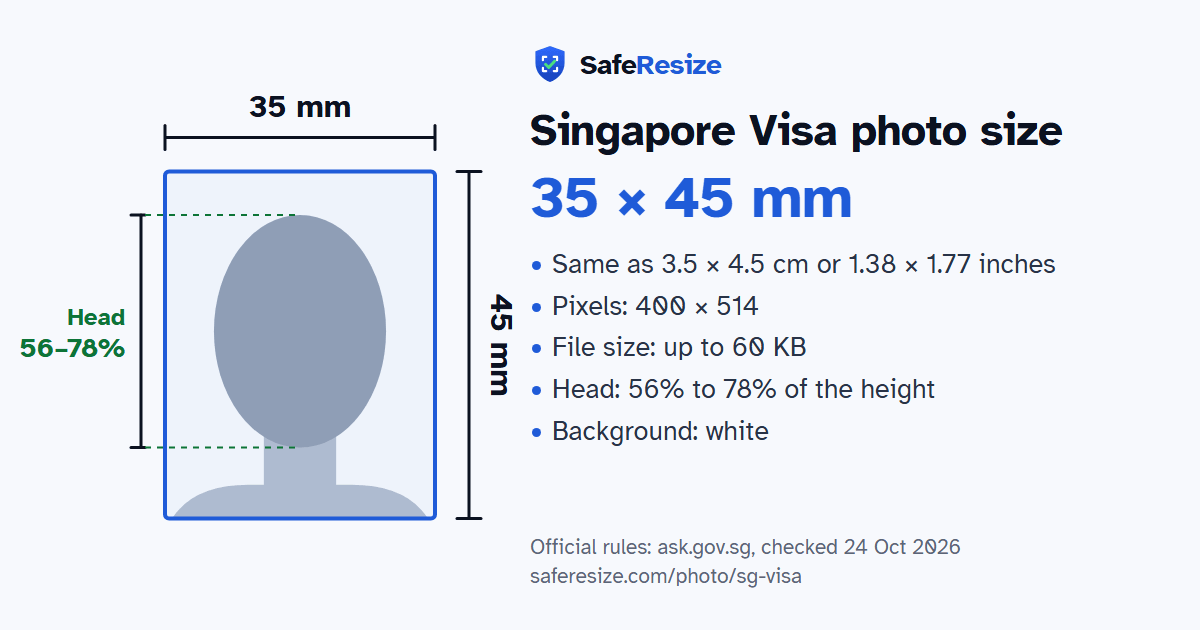
Official rules: 35 × 45 mm, 400 × 514 px, up to 60 KB, background: white. Source: ask.gov.sg, checked 24 Oct 2026.
Official rules: 35 × 45 mm, 400 × 514 px, up to 60 KB, background: white. Source: ask.gov.sg, checked 24 Oct 2026.
The Singapore Visa photo is 35 × 45 mm, 400 × 514 pixels, uploaded as a JPEG file up to 60 KB, on a white background.
| Printed size | 35 × 45 mm |
|---|---|
| In other units (a conversion) | 35 × 45 mm · 3.5 × 4.5 cm · 1.38 × 1.77 in · 413 × 531 px at 300 DPI · 827 × 1063 px at 600 DPI · ratio 7:9 |
| Pixels (official rule) | 400 × 514 pixels |
| File size | Up to 60 KB |
| Background | White |
| Head size | 56% to 78% of the photo height, chin to top of head |
| Source | ask.gov.sg |
| Checked | 24 Oct 2026 |
Passports from India, Pakistan, Bangladesh and the other countries on ICA's list need a Singapore entry visa. ICA takes no applications at its immigration counters. A local contact or strategic partner in Singapore files one through the SAVE e-Service; otherwise you use a Singapore Overseas Mission or its authorised visa agent, ideally in the 30 days before you arrive. The fee is S$30, and a decision usually takes three working days. The visa only lets you seek entry: officers at the checkpoint decide how long you stay.
The e-Service needs a digital photo, which ICA sets at 400 × 514 pixels, under 60 KB, in JPEG. It must be a colour picture from the last three months, against white, showing your full face; headgear is only for religious or racial custom and must leave your features visible. ICA warns that missing these points can delay the application or get it rejected. Applying in India, the High Commission in New Delhi wants two prints 35 mm wide and 45 mm high, with no borders and even exposure. It asks you to avoid white headgear and plain white clothing, and to keep hair off the eyebrows.
Sources, checked 24 Oct 2026: What are the photograph requirements for a visa application? (ICA, ask.gov.sg), Visa requirements (ICA), India visa requirements (ICA), SAVE user manual for authorised visa agents and strategic partners, individual visa (ICA, PDF), SAVE user manual for local contacts, individual visa (ICA, PDF) and Visa information (High Commission of the Republic of Singapore, New Delhi).
The photo is 35 × 45 mm. Official pixel rule: 400 × 514 pixels. SafeResize makes a 400 × 514 pixel file that meets it.
35 × 45 mm is 3.5 × 4.5 cm or 1.38 × 1.77 inches, in a 7:9 shape. Printed at 300 DPI it is 413 × 531 pixels, and at 600 DPI 827 × 1063 pixels. These are conversions of the official size, not extra rules. For the upload, the official pixel rule is: 400 × 514 pixels.
Up to 60 KB. SafeResize checks the size before you download, and keeps your file a little inside that limit, so it fits however the website counts a KB.
White. Stand in front of a plain wall with no pattern, and face a window so there are no shadows behind you. If your wall is not plain enough, the photo maker on this page can make the background white with an AI that runs on your device. Check the edges around your hair afterwards.
From the chin to the top of the head, your head should fill 56% to 78% of the photo height. The face guide in the tool shows both lines.
Yes. The photo rules on ask.gov.sg do not change with nationality, so Indian, Bangladeshi and Pakistani applicants follow the same ones. Which visa you can apply for does depend on your nationality, and a visa centre in your country may add its own checklist.
ICA's SAVE manual for visa agents says the file must be a JPEG under 60 KB and exactly 400 × 514 pixels, and suggests resizing it in Paint. Its manual for local contacts adds that a "403 Forbidden" error during the photo upload means the photo was blocked for security, so upload a different one.
Two passport-sized colour photographs taken within the last three months, says the High Commission in New Delhi, with the signed Form 14A and a passport valid for six months. You hand them to one of its authorised visa agents, who submits the application online. The processing fee is INR 2,100, and agents may charge a service fee of Rs 1,300 on top.
Yes, if you wear it for religious or racial custom: ICA accepts such headgear as long as it does not hide your facial features. The High Commission in New Delhi adds that the headgear should not be white.
Recent colour passport-size photo taken within the last 3 months. Show your full face, with no headgear. Headgear worn for religious or racial reasons is OK if it does not hide your face. The file must be under 60 KB. Applying in India: the High Commission in New Delhi also asks for two 35 × 45 mm prints, with no white headgear or plain white clothing.
JPEG. SafeResize saves a JPG (JPEG) file.
Yes. A photo taken at home is fine if it follows the rules above. It is easier if someone else takes it for you.
No. The photo is processed inside your browser and never leaves your phone or computer.
Source: ask.gov.sg, checked 24 Oct 2026. Rules can change, so confirm on the official page before you apply.