Qatar (Hayya) Visa Photo Size: 3 × 4 cm (30 × 40 mm), At Least 720 Pixels
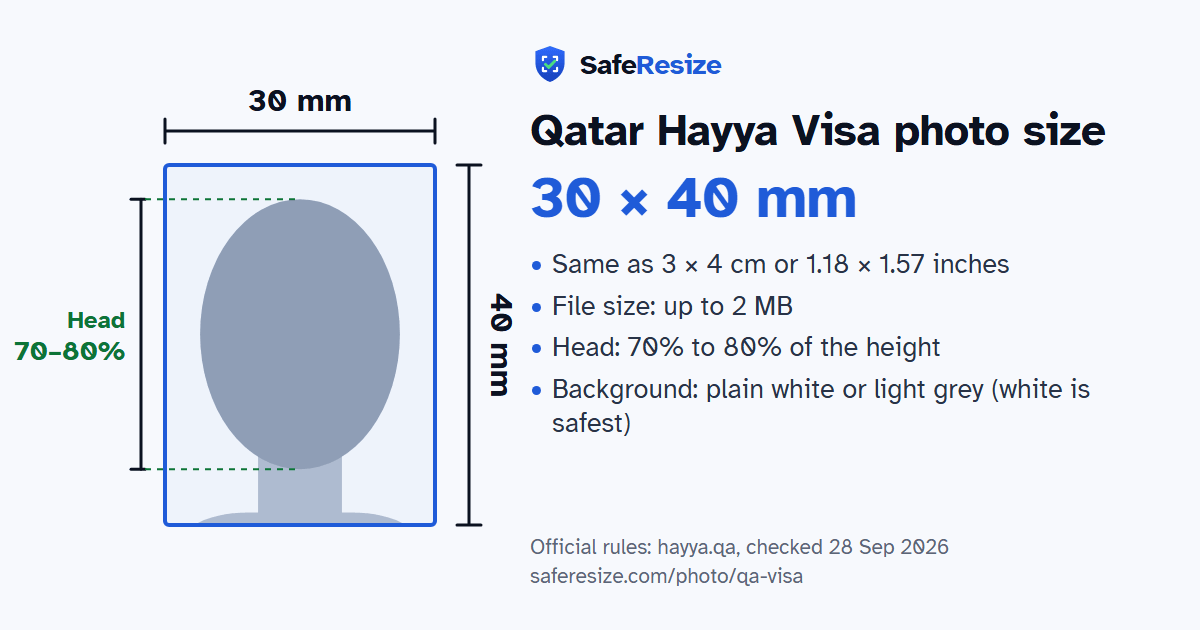
Official rules: 30 × 40 mm, up to 2 MB, background: plain white or light grey (white is safest). Source: hayya.qa, checked 28 Sep 2026.
Official rules: 30 × 40 mm, up to 2 MB, background: plain white or light grey (white is safest). Source: hayya.qa, checked 28 Sep 2026.
The Qatar Hayya Visa photo is 30 × 40 mm, uploaded as a file up to 2 MB.
| Printed size | 30 × 40 mm |
|---|---|
| In other units (a conversion) | 30 × 40 mm · 3 × 4 cm · 1.18 × 1.57 in · 354 × 472 px at 300 DPI · 709 × 945 px at 600 DPI · ratio 3:4 |
| Pixels (official rule) | 40 mm high × 30 mm wide (3:4), at least 720 pixels |
| File size | Up to 2 MB |
| Background | Plain white or light grey (white is safest) |
| Head size | 70% to 80% of the photo height, chin to top of head |
| Source | hayya.qa |
| Checked | 28 Sep 2026 |
Hayya is the portal and app through which Qatar issues its tourist e-Visas: the Tourist Visa (A1), the GCC Resident Visa (A2), the Visa with ETA (A3) for holders of a US, UK, Canadian, Schengen, Australian or New Zealand visa or residency, the A4 for companions of GCC citizens, and the visa-free F1 for US citizens. Its how-to guide puts the passport and personal photo uploads before your details. The FAQ gives the e-Visa fee as QAR 100, not refundable. Every visitor needs their own e-Visa, though children under 18 can be added to your application as dependents.
Hayya's personal photo guideline wants a colour shot taken within 12 months of applying, in sharp focus, with natural skin tones and good contrast against the background. It shows a close-up of your face and the top of your shoulders, head centred and not tilted, turned or rolled. Only one face may appear. Light should be natural, never coloured, and leave no shadow or glare. Hats, caps and headbands are out unless worn for religious reasons, with the face still clear. A rejected application shows the reason on your dashboard, though some cases give none.
Sources, checked 24 Oct 2026: Hayya personal photo guideline (Hayya, Qatar), Frequently asked questions (Hayya portal), How to guides (Hayya portal) and Visa services (Ministry of Interior, Qatar).
The photo is 30 × 40 mm. Official pixel rule: 40 mm high × 30 mm wide (3:4), at least 720 pixels. SafeResize makes a 900 × 1200 pixel file that meets it.
30 × 40 mm is 3 × 4 cm or 1.18 × 1.57 inches, in a 3:4 shape. Printed at 300 DPI it is 354 × 472 pixels, and at 600 DPI 709 × 945 pixels. These are conversions of the official size, not extra rules.
Up to 2 MB. SafeResize checks the size before you download, and keeps it inside the limit whether the website counts 1 KB as 1,000 or 1,024 bytes.
Plain white or light grey (white is safest). Stand in front of a plain wall with no pattern, and face a window so there are no shadows behind you. If your wall is not plain enough, the photo maker on this page can make the background white with an AI that runs on your device. Check the edges around your hair afterwards.
From the chin to the top of the head, your head should fill 70% to 80% of the photo height. The face guide in the tool shows both lines.
The official rules say: No shadows, glare, red-eye, sunglasses or tinted glasses.
Yes. The photo rules on hayya.qa do not change with nationality, so Indian, Bangladeshi and Pakistani applicants follow the same ones. Which visa you can apply for does depend on your nationality, and a visa centre in your country may add its own checklist.
The Hayya FAQ says a rejected application displays the reason under your dashboard, although in certain cases no reason is given, and approval is at the authorities' discretion. The photo guideline lists what to avoid, including more than one face, hair over the eyes, a tilted or turned head, shadows or glare, and coloured lighting.
Only if it meets the Hayya guideline, which asks for a photo taken within the 12 months before you apply, 40 mm high and 30 mm wide. The portal asks for the photo with the closest likeness to the one in your passport, as a JPG or JPEG of less than 2 MB.
The Hayya FAQ says you can still apply for a regular visit visa issued by the Ministry of Interior instead, depending on your profile and purpose. Hayya's photo guideline is written for Hayya applications, and the ministry's visa services page that we read gives no photo rules.
Colour, sharp, taken within 12 months. Head centred, neutral face, mouth closed, eyes open with no hair over them. Only one face. No shadows, glare, red-eye, sunglasses or tinted glasses. Religious head covering only, with the face clearly visible. Look as much like your passport photo as possible.
JPG or JPEG only. SafeResize saves a JPG (JPEG) file.
Yes. A photo taken at home is fine if it follows the rules above. It is easier if someone else takes it for you.
No. The photo is processed inside your browser and never leaves your phone or computer.
Source: hayya.qa, checked 28 Sep 2026. Rules can change, so confirm on the official page before you apply.