Malaysia eVISA (VDR) Photo Size: 35 × 50 mm, 25 KB or Less
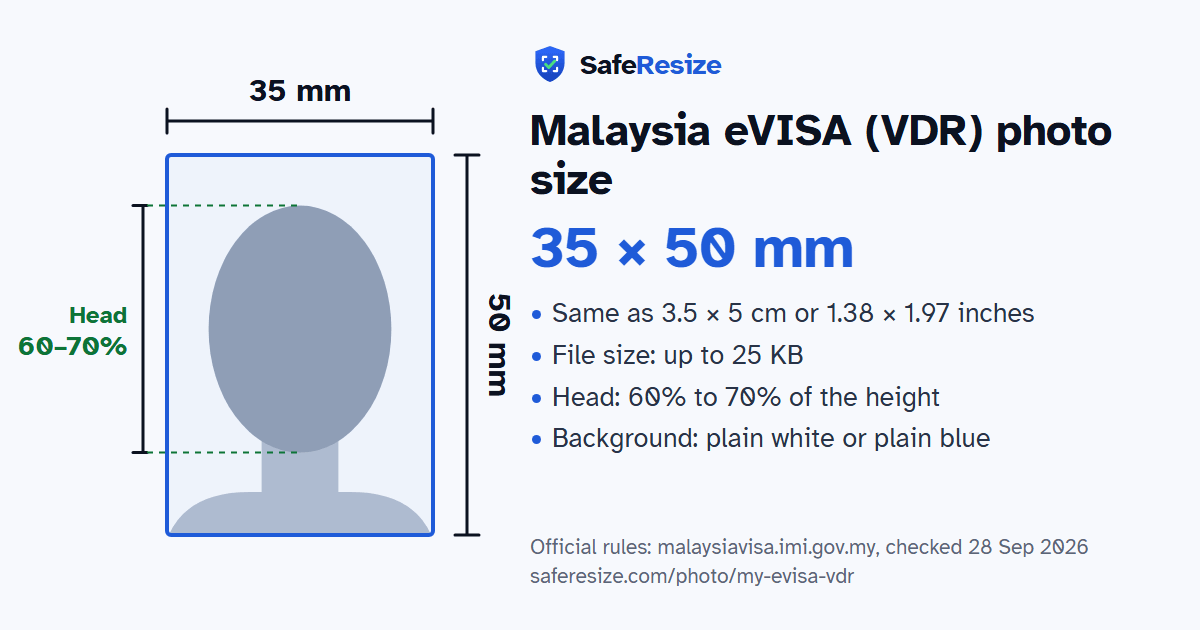
Official rules: 35 × 50 mm, up to 25 KB, background: plain white or plain blue. Source: malaysiavisa.imi.gov.my, checked 28 Sep 2026.
Official rules: 35 × 50 mm, up to 25 KB, background: plain white or plain blue. Source: malaysiavisa.imi.gov.my, checked 28 Sep 2026.
The Malaysia eVISA (VDR) photo is 35 × 50 mm, uploaded as a file up to 25 KB, on a plain white or plain blue background.
| Printed size | 35 × 50 mm |
|---|---|
| In other units (a conversion) | 35 × 50 mm · 3.5 × 5 cm · 1.38 × 1.97 in · 413 × 591 px at 300 DPI · 827 × 1181 px at 600 DPI · ratio 7:10 |
| Pixels (official rule) | Not stated; 35 × 50 mm photo size |
| File size | Up to 25 KB |
| Background | Plain white or plain blue |
| Head size | 60% to 70% of the photo height, chin to top of head |
| Source | malaysiavisa.imi.gov.my |
| Checked | 28 Sep 2026 |
A Visa with Reference (VDR) is the Malaysian visa for foreigners who need one to study, work or join family, unlike the VTR for social visits. A Malaysian office abroad issues it once Immigration headquarters approves. A Malaysian citizen sponsoring a relative applies while the applicant waits in their home country. For expatriates and dependants, the employer files the pass application in ESD Online; after the Approval Letter, the person gets the VDR from a Malaysian mission or the eVISA site. An Employment Pass must then be endorsed within 30 days of arrival, now as an ePASS.
The Expatriate Services Division sets the VDR photo at 35 × 50 mm, head 30 to 35 mm from chin to crown, on plain white or blue with no frame, and at most 25 KB in ESD Online. VTR photos must be on white. Religious head coverings may stay if the whole face shows. Since 1 July 2026, a notice says, the Immigration Department validates eVISA VDR photos, and MDEC warns that the eVISA system can reject a photo even after its approval, which can stop the application. Spectacle glare must not hide the eyes; a baby's face must be clear.
Sources, checked 25 Oct 2026: Visa With Reference (Immigration Department of Malaysia), Visa Dengan Rujukan (Immigration Department of Malaysia, in Malay), Visa requirement (Immigration Department of Malaysia), Activation of photo validation for eVISA VDR applications (Immigration Department of Malaysia, notice of 6 July 2026), Photo requirements (Expatriate Services Division, Immigration Department of Malaysia), ESD Online Guidebook V6 2025 (Expatriate Services Division), Dependant Pass (Expatriate Services Division), Updated photo requirements for eVISA/MyVisa applications (MDEC Expats Service Centre, 23 July 2026) and FAQs (High Commission of Malaysia, Dhaka).
The photo is 35 × 50 mm. The official rules do not fix a pixel size. SafeResize makes a sharp 280 × 400 pixel file that fits every other rule.
35 × 50 mm is 3.5 × 5 cm or 1.38 × 1.97 inches, in a 7:10 shape. Printed at 300 DPI it is 413 × 591 pixels, and at 600 DPI 827 × 1181 pixels. These are conversions of the official size, not extra rules.
Up to 25 KB. SafeResize checks the size before you download, and keeps it inside the limit whether the website counts 1 KB as 1,000 or 1,024 bytes.
Plain white or plain blue. Stand in front of a plain wall with no pattern, and face a window so there are no shadows behind you. If your wall is not plain enough, the photo maker on this page can make the background white with an AI that runs on your device. Check the edges around your hair afterwards.
From the chin to the top of the head, your head should fill 60% to 70% of the photo height. The face guide in the tool shows both lines.
The Expatriate Services Division asks for a 35 × 50 mm photo with the head 30 to 35 mm from chin to crown, on a plain white or plain blue background with no border. The file uploaded in ESD Online can be no more than 25 KB.
For an Employment Pass or Dependant Pass, the company logs in to its ESD account and submits the application; dependants can be a spouse or children under 18. Once the Approval Letter is out, the ESD guidebook says the company tells the applicant to get the VDR, from a Malaysian mission or through the eVISA website.
MDEC's Expats Service Centre says a photo may be rejected by the eVISA/MyVisa system after MDEC approval, which can stop the eVISA application, and that a new, fully compliant photo should be prepared before the applicant retries. The ESD photo page suggests downloading the uploaded photo and testing it with the eVisa Malaysia photo check tool before submitting.
The ESD guidebook says approved Employment, Dependant, Long Term Social Visit and Professional Visit Passes are issued as an ePASS, introduced in December 2022. It carries a QR code and should be kept with the passport, with no requirement to fix it inside.
Same layout as the Malaysia eVISA: head 30–35 mm on a 50 mm-high photo, no border, and no head covering except for religious reasons. The file must be 25 KB or smaller.
JPG or PNG (JPG makes it easier to stay under 25 KB). SafeResize saves a JPG (JPEG) file.
Yes. A photo taken at home is fine if it follows the rules above. It is easier if someone else takes it for you.
No. The photo is processed inside your browser and never leaves your phone or computer.
Source: malaysiavisa.imi.gov.my, checked 28 Sep 2026. Rules can change, so confirm on the official page before you apply.