Indonesia e-Visa & e-VOA Photo Size: 4 × 6 cm (At Least 400 × 600 Pixels)
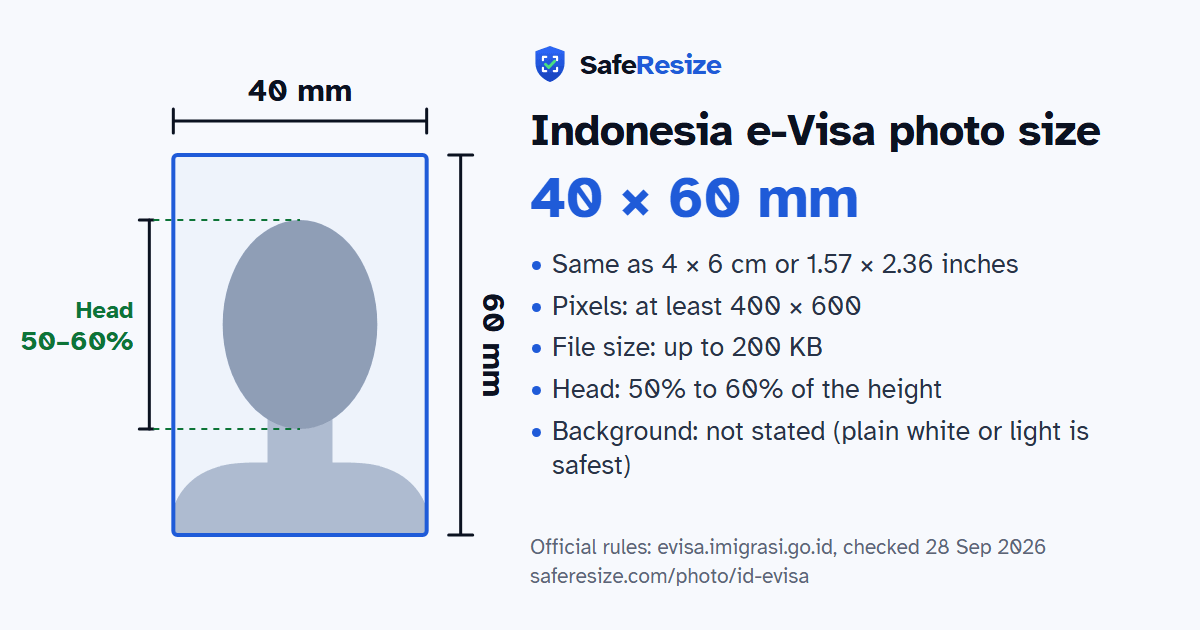
Official rules: 40 × 60 mm, at least 400 × 600 px, up to 200 KB, background: not stated (plain white or light is safest). Source: evisa.imigrasi.go.id, checked 28 Sep 2026.
Official rules: 40 × 60 mm, at least 400 × 600 px, up to 200 KB, background: not stated (plain white or light is safest). Source: evisa.imigrasi.go.id, checked 28 Sep 2026.
The Indonesia e-Visa photo is 40 × 60 mm, at least 400 × 600 pixels, uploaded as a file up to 200 KB.
| Printed size | 40 × 60 mm |
|---|---|
| In other units (a conversion) | 40 × 60 mm · 4 × 6 cm · 1.57 × 2.36 in · 472 × 709 px at 300 DPI · 945 × 1417 px at 600 DPI · ratio 2:3 |
| Pixels (official rule) | At least 400 × 600 pixels (4 × 6 cm, 2:3 portrait) |
| File size | Up to 200 KB |
| Background | Not stated (plain white or light is safest) |
| Head size | 50% to 60% of the photo height, chin to top of head |
| Source | evisa.imigrasi.go.id |
| Checked | 28 Sep 2026 |
On Indonesia's e-Visa website you register an account, which the Directorate General of Immigration verifies. Registration needs the biography page of your passport and a recent colour photo facing forward, 4 × 6 cm with at least 400 × 600 pixels, as a JPEG, JPG or PNG. The photo terms allow up to 2 MB, but the FAQ on the single-entry Visitor Visa gives 200 KB as the limit for both images, so a file of 200 KB or less meets both.
For proper composition, the head, from the top of the hair to the chin, should fill 50 to 60% of the image height, with the eyes 50 to 60% of the way up from the bottom. Blurry pictures, shots taken too close or too far away, images other than a face, and facial expressions are not recommended. The passport image must be sharp, landscape and not cropped or folded. The FAQ adds that a child with their own passport needs a separate request. The pages do not cover glasses or head coverings.
Sources, checked 19 Oct 2026: Create account (Indonesian e-Visa, Directorate General of Immigration) and FAQ (Indonesian e-Visa).
The photo is 40 × 60 mm. Official pixel rule: At least 400 × 600 pixels (4 × 6 cm, 2:3 portrait). SafeResize makes a 600 × 900 pixel file that meets it.
40 × 60 mm is 4 × 6 cm or 1.57 × 2.36 inches, in a 2:3 shape. Printed at 300 DPI it is 472 × 709 pixels, and at 600 DPI 945 × 1417 pixels. These are conversions of the official size, not extra rules. For the upload, the official pixel rule is: At least 400 × 600 pixels (4 × 6 cm, 2:3 portrait).
Up to 200 KB. SafeResize checks the size before you download, and keeps it inside the limit whether the website counts 1 KB as 1,000 or 1,024 bytes.
Not stated (plain white or light is safest). Stand in front of a plain wall with no pattern, and face a window so there are no shadows behind you. If your wall is not plain enough, the photo maker on this page can make the background white with an AI that runs on your device. Check the edges around your hair afterwards.
From the chin to the top of the head, your head should fill 50% to 60% of the photo height. The face guide in the tool shows both lines.
Yes. The photo rules on evisa.imigrasi.go.id do not change with nationality, so Indian, Bangladeshi and Pakistani applicants follow the same ones. Which visa you can apply for does depend on your nationality, and a visa centre in your country may add its own checklist.
Recent colour photo, facing forward, face only. Eyes at 50–60% of the photo height, measured from the bottom. Not too close or too far, no blur, no facial expression. Keep the file at or under 200 KB.
JPG or PNG (colour). SafeResize saves a JPG (JPEG) file.
Yes. A photo taken at home is fine if it follows the rules above. It is easier if someone else takes it for you.
No. The photo is processed inside your browser and never leaves your phone or computer.
Please note: Official pages disagree on the file size limit (2 MB or 200 KB), so keep your photo at or under 200 KB to be safe.
Source: evisa.imigrasi.go.id, checked 28 Sep 2026. Rules can change, so confirm on the official page before you apply.