NZeTA Photo Requirements: 900 × 1200 to 2250 × 3000 Pixels, 512 KB to 3 MB
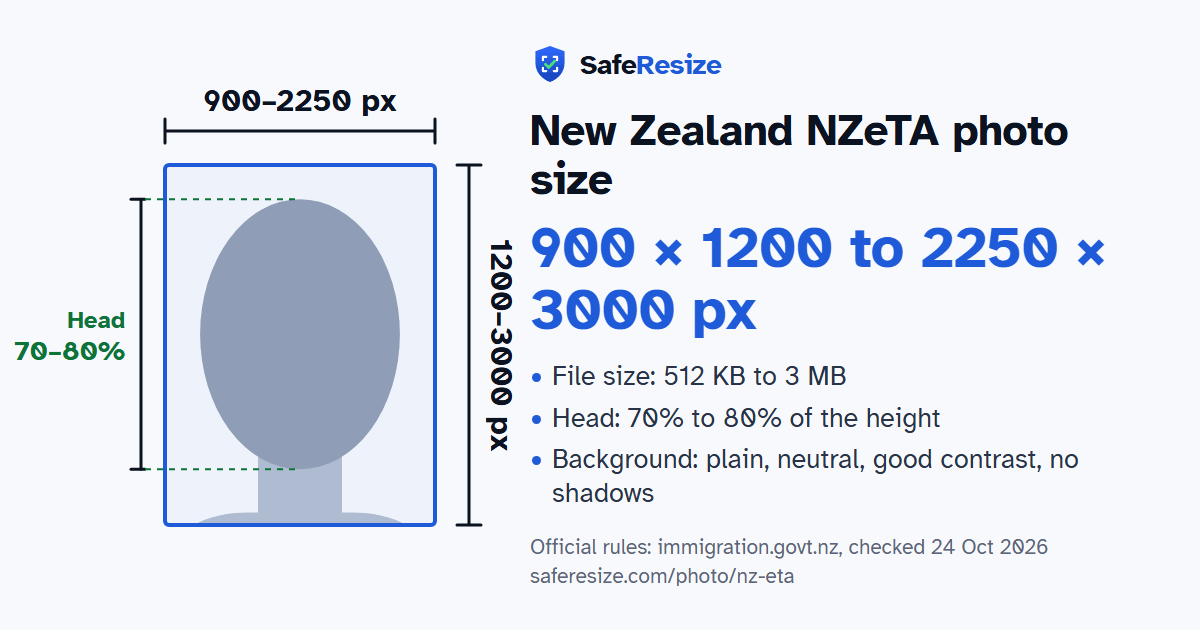
Official rules: 900 × 1200 to 2250 × 3000 px, 512 KB to 3 MB, background: plain, neutral, good contrast, no shadows. Source: immigration.govt.nz, checked 24 Oct 2026.
Official rules: 900 × 1200 to 2250 × 3000 px, 512 KB to 3 MB, background: plain, neutral, good contrast, no shadows. Source: immigration.govt.nz, checked 24 Oct 2026.
The New Zealand NZeTA photo is 900 × 1200 to 2250 × 3000 pixels, uploaded as a JPG or JPEG file from 512 KB to 3 MB.
| Printed size | No print size given |
|---|---|
| Pixels (official rule) | Portrait 3:4, 900 × 1200 to 2250 × 3000 pixels |
| File size | 512 KB to 3 MB |
| Background | Plain, neutral, good contrast, no shadows |
| Head size | 70% to 80% of the photo height, chin to top of head |
| Source | immigration.govt.nz |
| Checked | 24 Oct 2026 |
An NZeTA lets citizens of visa waiver countries, Australian permanent residents and cruise passengers, among others, come to New Zealand without applying for a visa first, or pass through Auckland International Airport for up to 24 hours. It costs from NZD 17, stays valid for 2 years and covers visits of up to 3 months each, or 6 months for UK citizens. INZ asks you to allow 72 hours. To request one you need the passport you will travel on and 1 acceptable photo, or a device that can take one.
Visitors must also be healthy, of good character and genuine, with at least NZD 1,000 a month to live on, or NZD 400 if accommodation is prepaid, and a paid ticket out. For the photo, the website form expects a JPG file of 512 KB to 3 MB, in 3:4 portrait shape, no more than 6 months old, with your face filling 70 to 80% of the frame. In the app you may take a selfie instead, which INZ allows nowhere else, though it still prefers that another person takes the picture. The pages give no separate photo rules for children.
Sources, checked 24 Oct 2026: New Zealand Electronic Travel Authority (NZeTA) (Immigration New Zealand), Acceptable photos for a visa or NZeTA (Immigration New Zealand) and Fixing errors when uploading a photo (Immigration New Zealand).
Official pixel rule: Portrait 3:4, 900 × 1200 to 2250 × 3000 pixels. SafeResize makes a 1800 × 2400 pixel file that meets it.
The official rule is in pixels: Portrait 3:4, 900 × 1200 to 2250 × 3000 pixels. It gives no size in inches or cm.
Between 512 KB and 3 MB. SafeResize checks the size before you download, and keeps it inside the limit whether the website counts 1 KB as 1,000 or 1,024 bytes.
Plain, neutral, good contrast, no shadows. Stand in front of a plain wall with no pattern, and face a window so there are no shadows behind you. The official rules do not allow edited photos, so SafeResize does not change the background for this document: a plain wall is the way.
From the chin to the top of the head, your head should fill 70% to 80% of the photo height. The face guide in the tool shows both lines.
The official rules say: Selfies are accepted only in the NZeTA mobile app.
Yes, prescription glasses are fine if the lenses are clear, not tinted, the frames are not so heavy that they cover your face, and there is no glare. If the upload reports glare or an obscured eye region, INZ suggests taking the glasses off and taking a new photo.
INZ says this error means it cannot see your face clearly. Light the whole image evenly, use a background that is neither too bright nor too dark, as light grey often works well, and adjust your camera's exposure settings.
Yes. Each family member needs an NZeTA and must meet the requirements; the online form takes one person per request, while the app handles up to 10 people at once. If your child is endorsed on your passport, INZ accepts that as the child's travel document, and you enter your own passport details in the child's request.
Same rules as online visa photos: taken within 6 months, not edited (no AI or filters), face fills 70–80% of the photo, neutral expression. Only you in the photo. Selfies are accepted only in the NZeTA mobile app. NZeTA is online only.
JPG or JPEG. SafeResize saves a JPG (JPEG) file.
Yes. A photo taken at home is fine if it follows the rules above. It is easier if someone else takes it for you.
No. The photo is processed inside your browser and never leaves your phone or computer.
Source: immigration.govt.nz, checked 24 Oct 2026. Rules can change, so confirm on the official page before you apply.