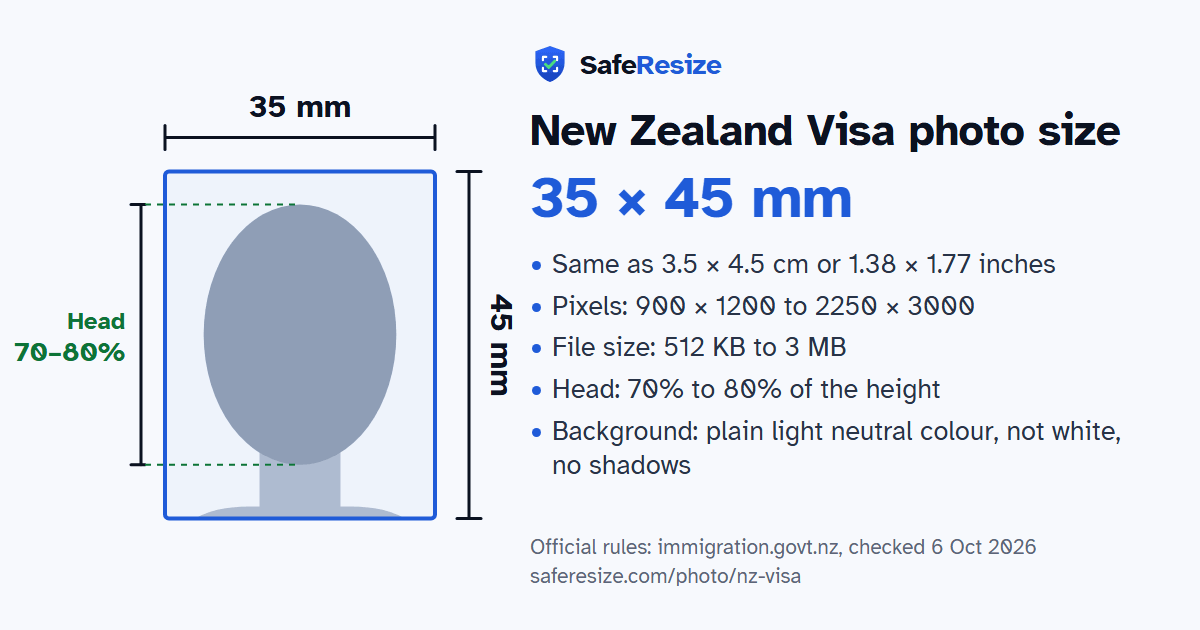
New Zealand Visa Photo Size: 900 × 1200 to 2250 × 3000 Pixels Online, 35 × 45 mm on Paper
Official rules: 35 × 45 mm, 900 × 1200 to 2250 × 3000 px, 512 KB to 3 MB, background: plain light neutral colour, not white, no shadows. Source: immigration.govt.nz, checked 6 Oct 2026.
New Zealand Visa photo size at a glance
The New Zealand Visa photo is 35 × 45 mm, 900 × 1200 to 2250 × 3000 pixels, uploaded as a JPG or JPEG file from 512 KB to 3 MB.
Printed size
35 × 45 mm
In other units (a conversion)
35 × 45 mm · 3.5 × 4.5 cm · 1.38 × 1.77 in · 413 × 531 px at 300 DPI · 827 × 1063 px at 600 DPI · ratio 7:9
Pixels (official rule)
Portrait 3:4, 900 × 1200 to 2250 × 3000 pixels
File size
512 KB to 3 MB
Background
Plain light neutral colour, not white, no shadows
Head size
70% to 80% of the photo height, chin to top of head
The New Zealand Visa photo, drawn to its shape: 35 × 45 mm, with the head 70% to 80% of the photo height. From the official rules (immigration.govt.nz, checked 6 Oct 2026).
What the official pages say about the New Zealand Visa photo
Immigration New Zealand applies one photo standard to visa applications and to the NZeTA, which can only be requested online. Your photo is collected as biometric information, to establish a record of your identity and help decide your application, and without one INZ may not process it. Online, a picture the system cannot use triggers an error message when you submit, and INZ publishes a fix for each one. A paper application takes a print 35 mm wide and 45 mm high, with further instructions on the form.
INZ warns that photos enhanced or altered with AI may delay your application or get it declined. Switch off any phone setting that filters pictures automatically, and do not digitally erase glasses, jewellery, headbands or hats. Selfies are only accepted in the NZeTA mobile app, and INZ says a professional photographer's picture is more likely to be accepted. Your ears must show unless you wear a scarf for religious or medical reasons, and a covering may not hide your mouth or the sides of your face. Patterned clothes and T-shirts with pictures can cause technical issues. The pages say nothing specific about babies or children.
Stand about an arm's length from the camera in front of a plain wall (plain light neutral colour, not white, no shadows). Face a window for soft, even light.
Add the photo on this page. It stays on your device.
Drag and zoom until your face fills the green oval: top of the head on the top line, chin on the bottom line.
Download the photo. The pixels, file size and format are checked before you save it.
Upload it to the official application.
Questions and answers
What size is the New Zealand Visa photo?
The photo is 35 × 45 mm. Official pixel rule: Portrait 3:4, 900 × 1200 to 2250 × 3000 pixels. SafeResize makes a 1800 × 2400 pixel file that meets it.
What is the New Zealand Visa photo size in cm, inches and pixels?
35 × 45 mm is 3.5 × 4.5 cm or 1.38 × 1.77 inches, in a 7:9 shape. Printed at 300 DPI it is 413 × 531 pixels, and at 600 DPI 827 × 1063 pixels. These are conversions of the official size, not extra rules. For the upload, the official pixel rule is: Portrait 3:4, 900 × 1200 to 2250 × 3000 pixels.
What file size does the New Zealand Visa photo need to be?
Between 512 KB and 3 MB. SafeResize checks the size before you download, and keeps it inside the limit whether the website counts 1 KB as 1,000 or 1,024 bytes.
What background colour does the New Zealand Visa photo need?
Plain light neutral colour, not white, no shadows. Stand in front of a plain wall with no pattern, and face a window so there are no shadows behind you. The official rules do not allow edited photos, so SafeResize does not change the background for this document: a plain wall is the way.
How big should my head be in the New Zealand Visa photo?
From the chin to the top of the head, your head should fill 70% to 80% of the photo height. The face guide in the tool shows both lines.
Can I wear glasses in my New Zealand Visa photo?
The official rules say: Clear, thin-framed glasses OK if no glare.
Is the New Zealand Visa photo the same for Indian, Bangladeshi and Pakistani applicants?
Yes. The photo rules on immigration.govt.nz do not change with nationality, so Indian, Bangladeshi and Pakistani applicants follow the same ones. Which visa you can apply for does depend on your nationality, and a visa centre in your country may add its own checklist.
What does the NZ visa photo error "not a passport style portrait of suitable file size" mean?
INZ says your image may be too big or too small. Its fix is a portrait photo between 900 × 1200 and 2250 × 3000 pixels and between 500 KB and 3 MB, resized or taken again.
Why does my NZ visa photo say only one face is allowed?
INZ says a photo can appear to have more than one face if it has strong patterns in the background or on your clothing, or if it is very large. Be the only person in the photo, wear plain clothes against a pale, plain background, and if the photo already meets the rules, try reducing its size.
Can I use a selfie for my NZeTA or NZ visa photo?
Only for an NZeTA requested in the mobile app; otherwise INZ recommends having someone else take your photo where possible. In the app, stretch your arm out as far as possible, hold the phone at the height of your eyebrows and keep the light source behind the phone.
Is the NZeTA photo the same as the New Zealand visa photo?
Yes. Immigration New Zealand gives one set of photo standards for visa applications and NZeTA requests, and the photo is used as biometric information for both. An NZeTA can only be requested online.
What else do the New Zealand Visa photo rules say?
Taken within 6 months. Not edited: no filters, beauty effects, AI tools or background changes. Face fills 70–80% of the photo (ideally 75%). Neutral expression, eyes open, ears visible. Clear, thin-framed glasses OK if no glare. Only you in the photo, good contrast. Paper applications use a 35 × 45 mm print. INZ's photo page allows files of 512 KB to 3.14 MB and its guide for photographers 500 KB to 3 MB; SafeResize keeps the file between 512 KB and 3 MB, which meets both.
Which file format should I use?
JPG or JPEG. SafeResize saves a JPG (JPEG) file.
Can I take this photo at home?
Yes. A photo taken at home is fine if it follows the rules above. It is easier if someone else takes it for you.
Is my photo uploaded to SafeResize?
No. The photo is processed inside your browser and never leaves your phone or computer.
Source: immigration.govt.nz, checked 6 Oct 2026. Rules can change, so confirm on the official page before you apply.