OCI Card Photo Size: Square, 200 × 200 to 900 × 900 Pixels, Up to 200 KB
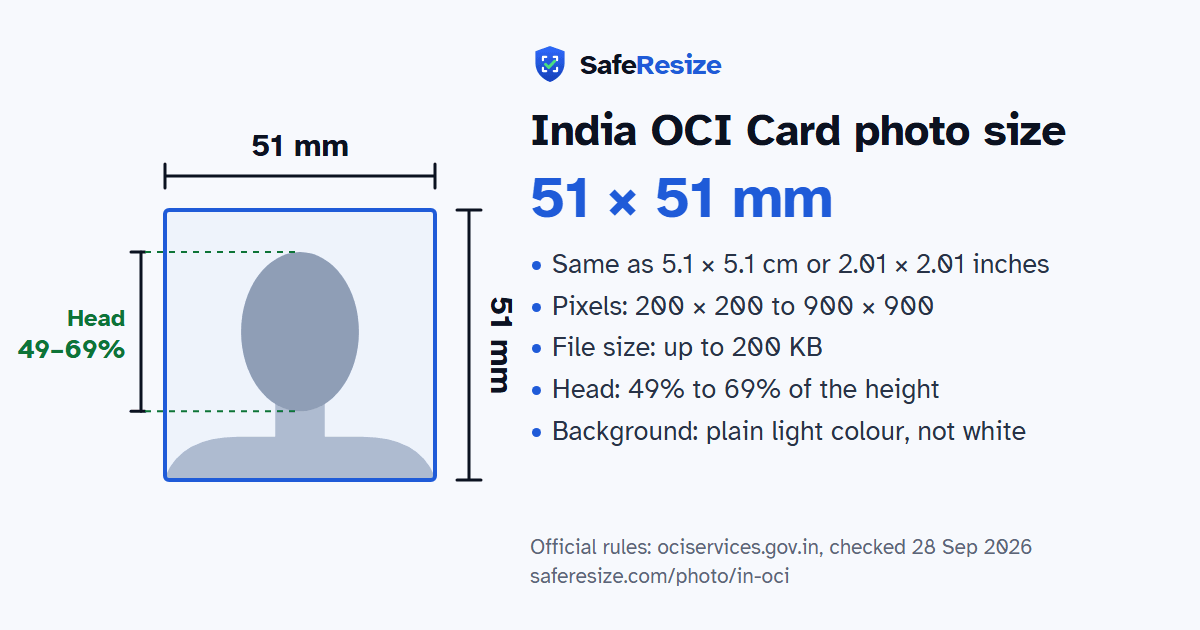
Official rules: 51 × 51 mm, 200 × 200 to 900 × 900 px, up to 200 KB, background: plain light colour, not white. Source: ociservices.gov.in, checked 28 Sep 2026.
Official rules: 51 × 51 mm, 200 × 200 to 900 × 900 px, up to 200 KB, background: plain light colour, not white. Source: ociservices.gov.in, checked 28 Sep 2026.
The India OCI Card photo is 51 × 51 mm, 200 × 200 to 900 × 900 pixels, uploaded as a JPG or JPEG file up to 200 KB.
| Printed size | 51 × 51 mm |
|---|---|
| In other units (a conversion) | 51 × 51 mm · 5.1 × 5.1 cm · 2.01 × 2.01 in · 602 × 602 px at 300 DPI · 1205 × 1205 px at 600 DPI · ratio 1:1 (square) |
| Pixels (official rule) | Square, 200 × 200 to 900 × 900 pixels |
| File size | Up to 200 KB |
| Background | Plain light colour, not white |
| Head size | 49% to 69% of the photo height, chin to top of head (from older consulate sheets; the OCI FAQ says the face should cover about 80% of the photo) |
| Source | ociservices.gov.in |
| Checked | 28 Sep 2026 |
The OCI card is for foreign citizens of Indian origin, including the children, grandchildren and great-grandchildren of people who were or could have been Indian citizens, minor children of Indian citizens, and the foreign spouse of an Indian citizen or OCI cardholder after at least two years of registered marriage. You are not eligible if you, or a parent, grandparent or great-grandparent, are or were a citizen of Pakistan, Bangladesh or another country the government names. Applications are made only online at ociservices.gov.in.
You upload a square photo of at least 51 × 51 mm, with the face covering about 80% of it, and an image of your signature, both as JPEGs of up to 200 KB. The photo needs a plain light background that is not white, no border, and your head and shoulders with your full face in the middle. The FAQ warns that photos that do not meet these standards will be rejected and may delay the application. After submitting online, you bring only original documents to the Indian mission, post or FRRO for checking. If they find a problem with your photo, they email you and upload the corrected one for you.
Source, checked 5 Oct 2026: OCI FAQ (ociservices.gov.in).
The photo is 51 × 51 mm. Official pixel rule: Square, 200 × 200 to 900 × 900 pixels. SafeResize makes a 600 × 600 pixel file that meets it.
51 × 51 mm is 5.1 × 5.1 cm or 2.01 × 2.01 inches, a square. Printed at 300 DPI it is 602 × 602 pixels, and at 600 DPI 1205 × 1205 pixels. These are conversions of the official size, not extra rules. For the upload, the official pixel rule is: Square, 200 × 200 to 900 × 900 pixels.
Up to 200 KB. SafeResize checks the size before you download, and keeps it inside the limit whether the website counts 1 KB as 1,000 or 1,024 bytes.
Plain light colour, not white. Stand in front of a plain wall with no pattern, and face a window so there are no shadows behind you. The official rules do not allow edited photos, so SafeResize does not change the background for this document: a plain wall is the way.
From the chin to the top of the head, your head should fill 49% to 69% of the photo height. The face guide in the tool shows both lines.
The official rules say: No tinted or dark glasses, and no glare.
The official rules say: The official page gives no separate rule for babies and children, so use the same rules for them.
Head 25–35 mm on a square photo at least 51 × 51 mm. Full face, centred, with shoulders showing. No borders. No tinted or dark glasses, and no glare. No retouching. Your signature file must also be JPEG, up to 200 KB.
JPG or JPEG. SafeResize saves a JPG (JPEG) file.
Yes. A photo taken at home is fine if it follows the rules above. It is easier if someone else takes it for you.
No. The photo is processed inside your browser and never leaves your phone or computer.
Please note: The official OCI website says the face should fill about 80% of the photo, while older consulate sheets say a head of 25 to 35 mm (about half to two thirds of the photo). Check the upload screen and follow what it says. The official page gives no separate rule for babies and children, so use the same rules for them.
Source: ociservices.gov.in, checked 28 Sep 2026. Rules can change, so confirm on the official page before you apply.