US Passport Photo Size: 2 × 2 Inches (51 × 51 mm) for DS-11 and DS-82
Official rules: 2 × 2 inch print, background: plain white or off-white. Source: travel.state.gov, checked 28 Sep 2026.
Official rules: 2 × 2 inch print, background: plain white or off-white. Source: travel.state.gov, checked 28 Sep 2026.
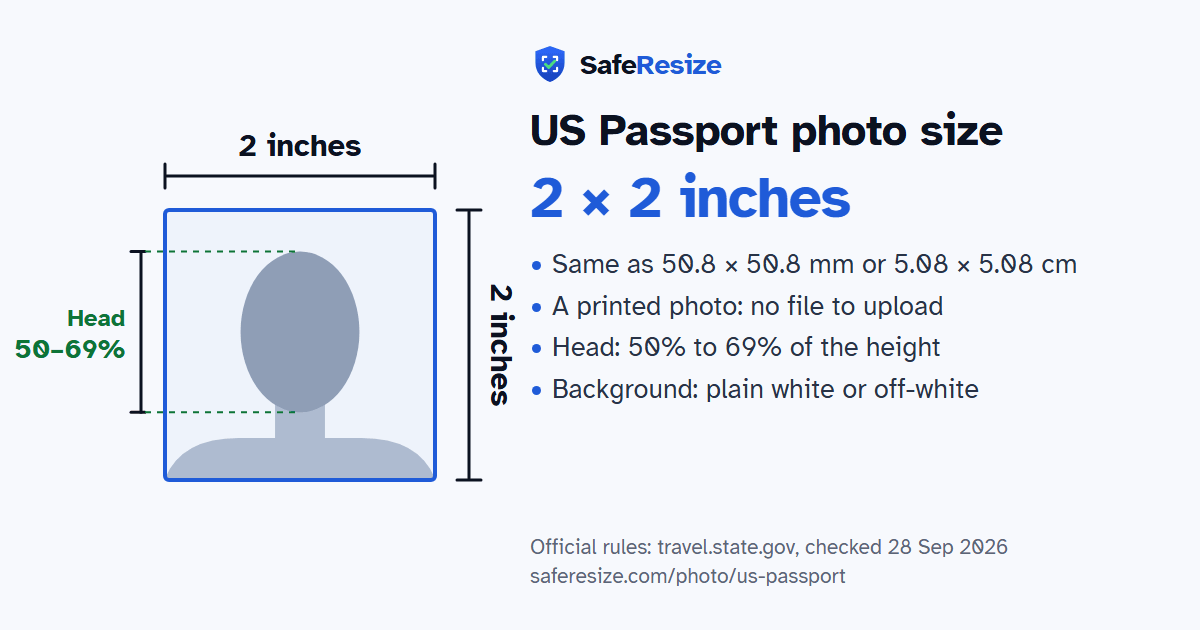
The US Passport photo is a printed photo, 2 × 2 inches (51 × 51 mm), on a plain white or off-white background.
| Printed size | 2 × 2 inches (51 × 51 mm) |
|---|---|
| In other units (a conversion) | 50.8 × 50.8 mm · 5.08 × 5.08 cm · 2 × 2 in · 600 × 600 px at 300 DPI · 1200 × 1200 px at 600 DPI · ratio 1:1 (square) |
| Pixels (official rule) | Print only (2 × 2 inch photo, 51 × 51 mm) |
| File size | No file: the rules ask for printed photos |
| Background | Plain white or off-white |
| Head size | 50% to 69% of the photo height, chin to top of head |
| Source | travel.state.gov |
| Checked | 28 Sep 2026 |
Forms DS-11 and DS-82 are the paper routes to a US passport. DS-11 is for a new passport, and also for anyone whose most recent passport was issued before they turned 16; DS-82 is the adult renewal form. Each takes 1 printed photo. With a DS-11 you hand it over loose, and the employee reviews it and staples it on. With a DS-82 you staple it yourself, with 4 staples placed vertically in the corners near its outer edges, without bending it. Renewing online takes an uploaded digital photo instead.
The State Department's photo page, as we last read it in September 2026, calls unacceptable photos the top reason it puts applications on hold. Smiling is allowed if your mouth stays closed. Glasses come off unless a doctor signs a note that you cannot remove them. A religious head covering needs your signed statement that you wear it daily in public, and must be a single colour without patterns or small holes. Uniforms, camouflage and headphones are out. A baby can lie on a white or off-white sheet, alone in the picture, and its eyes need not be fully open.
Sources, checked 24 Oct 2026: Passport Photos (travel.state.gov, checked September 2026), DS-11: Application for a New Passport (USEmbassy.gov) and DS-82: Passport Renewal for Adults (USEmbassy.gov).
The photo is 2 × 2 inches. The official rule: Print only (2 × 2 inch photo, 51 × 51 mm). This document takes printed photos, so there is no file to upload. SafeResize makes a 4 × 6 inch print sheet with several copies at exactly this size.
2 × 2 inches is 50.8 × 50.8 mm or 5.08 × 5.08 cm, a square. Printed at 300 DPI it is 600 × 600 pixels, and at 600 DPI 1200 × 1200 pixels. These are conversions of the official size, not extra rules.
Plain white or off-white. Stand in front of a plain wall with no pattern, and face a window so there are no shadows behind you. The official rules do not allow edited photos, so SafeResize does not change the background for this document: a plain wall is the way.
From the chin to the top of the head, your head should fill 50% to 69% of the photo height. The face guide in the tool shows both lines.
The official rules say: No glasses, unless your doctor signs a note for a medical reason.
The State Department says unacceptable photos are the number one reason it puts passport applications on hold. Its examples include shadows or uneven light, a head that is too big or too small, blur, grain or visible printer dots, red eye, glasses, and any change made with software, filters or AI. Photocopies, scanned photos and damaged prints with holes, creases or smudges are not accepted either.
Yes. The State Department says you can smile as long as your eyes are open and your mouth is closed, and asks you to avoid exaggerated expressions. A photo with your mouth open is one of its unacceptable examples.
Yes, if you wear it for religious purposes and send a signed statement that it is religious attire worn daily in public. Your full face must show with no shadows, and the covering should be one colour, without patterns or small holes. A covering worn for medical reasons needs a signed doctor's statement instead.
Only after a significant change: major facial surgery or trauma, adding or removing many large facial piercings or tattoos, or significant weight loss or gain. Growing a beard, colouring your hair and normal ageing do not count, and if you can still be identified from your current passport photo, the State Department says not to apply for a new passport.
Head 1 to 1 3/8 inch (25–35 mm) from chin to top of head. Colour photo from the last 6 months. No glasses, unless your doctor signs a note for a medical reason. Eyes open, mouth closed (a smile is fine). Print on matte or glossy photo paper. No stretching, filters, editing software or AI changes. No photocopies or scans.
Yes. A photo you take yourself is fine if it follows the rules above. Download the 4 × 6 inch print sheet and print it at 100% (actual size) at a photo shop or on photo paper, then cut along the lines.
No. The photo is processed inside your browser and never leaves your phone or computer.
Source: travel.state.gov, checked 28 Sep 2026. Rules can change, so confirm on the official page before you apply.