Canada Visa Photo Size: 35 × 45 mm (At Least 420 × 540 Pixels) for Visitor Visas, Study and Work Permits
Official rules: 35 × 45 mm, at least 420 × 540 px, at least 60 KB (ideally 240 KB), background: plain white or light-coloured. Source: canada.ca, checked 6 Oct 2026.
Canada Visa photo size at a glance
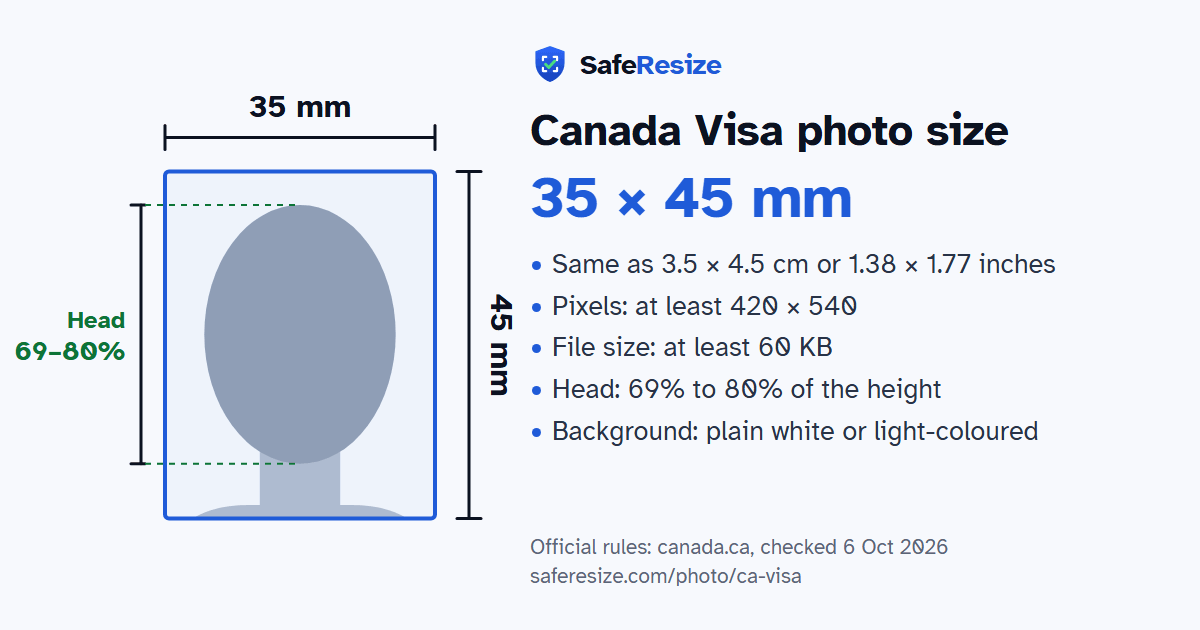
The Canada Visa photo is 35 × 45 mm, at least 420 × 540 pixels, uploaded as a JPEG or JPEG2000 file of at least 60 KB (ideally 240 KB), on a plain white or light-coloured background.
Printed size
35 × 45 mm
In other units (a conversion)
35 × 45 mm · 3.5 × 4.5 cm · 1.38 × 1.77 in · 413 × 531 px at 300 DPI · 827 × 1063 px at 600 DPI · ratio 7:9
Pixels (official rule)
At least 420 × 540 pixels; scans of printed photos at least 600 ppi
File size
At least 60 KB (ideally 240 KB)
Background
Plain white or light-coloured
Head size
69% to 80% of the photo height, chin to top of head
The Canada Visa photo, drawn to its shape: 35 × 45 mm, with the head 69% to 80% of the photo height. From the official rules (canada.ca, checked 6 Oct 2026).
What the official pages say about the Canada Visa photo
This SafeResize page covers the digital photo for Canadian visitor visas, study permits and work permits applied for online with IRCC. The digital rules we follow are the ones IRCC gives for International Experience Canada work permits: at least 420 × 540 pixels, in colour, as a JPEG or JPEG2000 file, ideally 240 KB and not under 60 KB, showing your full face and the tops of your shoulders. If you scan a printed photo, use at least 600 pixels per inch.
Paper applications use prints instead: two identical photos at least 35 × 45 mm, taken in the last six months on a plain white or light-coloured background, with the head 31 to 36 mm from chin to crown. Non-tinted prescription glasses are fine if your eyes are clearly visible, but sunglasses are not. If you wear a head covering for religious reasons, your full facial features must show. Digital photos must not be altered in any way. If your photos do not meet the specifications, IRCC asks for new ones before it processes your application.
Stand about an arm's length from the camera in front of a plain wall (plain white or light-coloured). Face a window for soft, even light.
Add the photo on this page. It stays on your device.
Drag and zoom until your face fills the green oval: top of the head on the top line, chin on the bottom line.
Download the photo. The pixels, file size and format are checked before you save it.
Upload it to the official application.
Questions and answers
What size is the Canada Visa photo?
The photo is 35 × 45 mm. Official pixel rule: At least 420 × 540 pixels; scans of printed photos at least 600 ppi. SafeResize makes a 840 × 1080 pixel file that meets it.
What is the Canada Visa photo size in cm, inches and pixels?
35 × 45 mm is 3.5 × 4.5 cm or 1.38 × 1.77 inches, in a 7:9 shape. Printed at 300 DPI it is 413 × 531 pixels, and at 600 DPI 827 × 1063 pixels. These are conversions of the official size, not extra rules. For the upload, the official pixel rule is: At least 420 × 540 pixels; scans of printed photos at least 600 ppi.
What file size does the Canada Visa photo need to be?
At least 60 KB. The official page calls 240 KB the ideal size, not a limit, so SafeResize makes a file between 60 KB and 240 KB, whether the website counts 1 KB as 1,000 or 1,024 bytes.
What background colour does the Canada Visa photo need?
Plain white or light-coloured. Stand in front of a plain wall with no pattern, and face a window so there are no shadows behind you. The official rules do not allow edited photos, so SafeResize does not change the background for this document: a plain wall is the way.
How big should my head be in the Canada Visa photo?
From the chin to the top of the head, your head should fill 69% to 80% of the photo height. The face guide in the tool shows both lines.
Can I wear glasses in my Canada Visa photo?
The official rules say: Clear (not tinted) glasses are fine if your eyes are clearly visible.
Is the Canada Visa photo the same for Indian, Bangladeshi and Pakistani applicants?
Yes. The photo rules on canada.ca do not change with nationality, so Indian, Bangladeshi and Pakistani applicants follow the same ones. Which visa you can apply for does depend on your nationality, and a visa centre in your country may add its own checklist.
What else do the Canada Visa photo rules say?
Colour photo taken within 6 months, facing the front, showing your whole head and the tops of your shoulders. Neutral face, mouth closed. Clear (not tinted) glasses are fine if your eyes are clearly visible. No editing. 240 KB is the ideal size, not a strict maximum. Paper visitor-visa applicants who give biometrics need no printed photos.
Which file format should I use?
JPEG or JPEG2000. SafeResize saves a JPG (JPEG) file.
Can I take this photo at home?
Yes. A photo taken at home is fine if it follows the rules above. It is easier if someone else takes it for you.
Is my photo uploaded to SafeResize?
No. The photo is processed inside your browser and never leaves your phone or computer.
Please note: IRCC gives these digital rules (at least 420 × 540 pixels, at least 60 KB, ideally 240 KB) on its International Experience Canada work permit page, and this page uses them for visitor visas and study permits too. If your application screen asks for something else, follow it.
Source: canada.ca, checked 6 Oct 2026. Rules can change, so confirm on the official page before you apply.