Nigerian Passport Photograph Size: At Least 600 × 800 Pixels (NIS Online Upload)
Official rules: at least 600 × 800 px, up to 2 MB, background: white. Source: passport.immigration.gov.ng, checked 28 Sep 2026.
Official rules: at least 600 × 800 px, up to 2 MB, background: white. Source: passport.immigration.gov.ng, checked 28 Sep 2026.
The Nigeria Passport photo is at least 600 × 800 pixels, uploaded as a JPG, JPEG or PNG file up to 2 MB, on a white background.
| Printed size | No print size given |
|---|---|
| Pixels (official rule) | At least 600 × 800 pixels (portrait) |
| File size | Up to 2 MB |
| Background | White |
| Head size | 50% to 69% of the photo height, chin to top of head |
| Source | passport.immigration.gov.ng |
| Checked | 28 Sep 2026 |
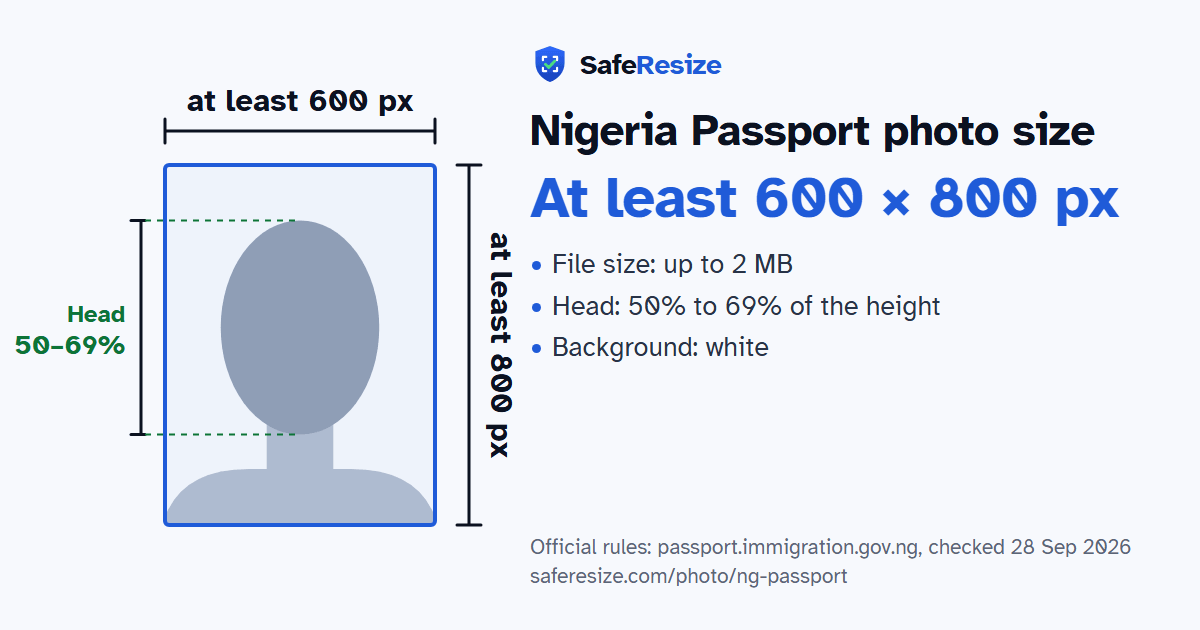
The Nigeria Immigration Service portal asks for a "Passport Photograph" when you apply for a Nigerian passport online, and the photo you upload is the one printed in your passport. Its instructions ask for a colour image of at least 600 × 800 pixels and less than 2 MB, with a white background. You must have a neutral expression, with both eyes open and your mouth closed, because smiling or frowning changes your features. Keep hair off your face and ears, and do not wear headphones, a mask or glasses.
Light the photo evenly, neither too dark nor too bright, with no harsh shadows, reflections or red eye. Your head and shoulders should be centred, looking straight at the camera. The portal's Test Photo Upload lets you check a photo against these rules before you start the application. For an infant, it accepts eyes that are not fully open. After the online form, you book an appointment at a passport processing centre for your biometric capture.
Source, checked 5 Oct 2026: Passport photo instructions (Nigeria Immigration Service passport portal).
Official pixel rule: At least 600 × 800 pixels (portrait). SafeResize makes a 600 × 800 pixel file that meets it.
The official rule is in pixels: At least 600 × 800 pixels (portrait). It gives no size in inches or cm.
Up to 2 MB. SafeResize checks the size before you download, and keeps it inside the limit whether the website counts 1 KB as 1,000 or 1,024 bytes.
White. Stand in front of a plain wall with no pattern, and face a window so there are no shadows behind you. If your wall is not plain enough, the photo maker on this page can make the background white with an AI that runs on your device. Check the edges around your hair afterwards.
From the chin to the top of the head, your head should fill 50% to 69% of the photo height. The face guide in the tool shows both lines.
The official rules say: No glasses, headphones or masks.
Colour photo from the last 6 months. Neutral expression (no smile), eyes open. No glasses, headphones or masks. Hair off face and ears, even lighting. Eyes at 56–69% of photo height. This photo goes in your passport; you still give biometrics at an NIS office by appointment.
JPG, JPEG or PNG. SafeResize saves a JPG (JPEG) file.
Yes. A photo taken at home is fine if it follows the rules above. It is easier if someone else takes it for you.
No. The photo is processed inside your browser and never leaves your phone or computer.
Source: passport.immigration.gov.ng, checked 28 Sep 2026. Rules can change, so confirm on the official page before you apply.