Pakistan Passport Photo Size: 35 × 45 mm (Online MRP Renewal)
Official rules: 35 × 45 mm, up to 5 MB, background: plain white. Source: onlinemrp.dgip.gov.pk, checked 28 Sep 2026.
Official rules: 35 × 45 mm, up to 5 MB, background: plain white. Source: onlinemrp.dgip.gov.pk, checked 28 Sep 2026.
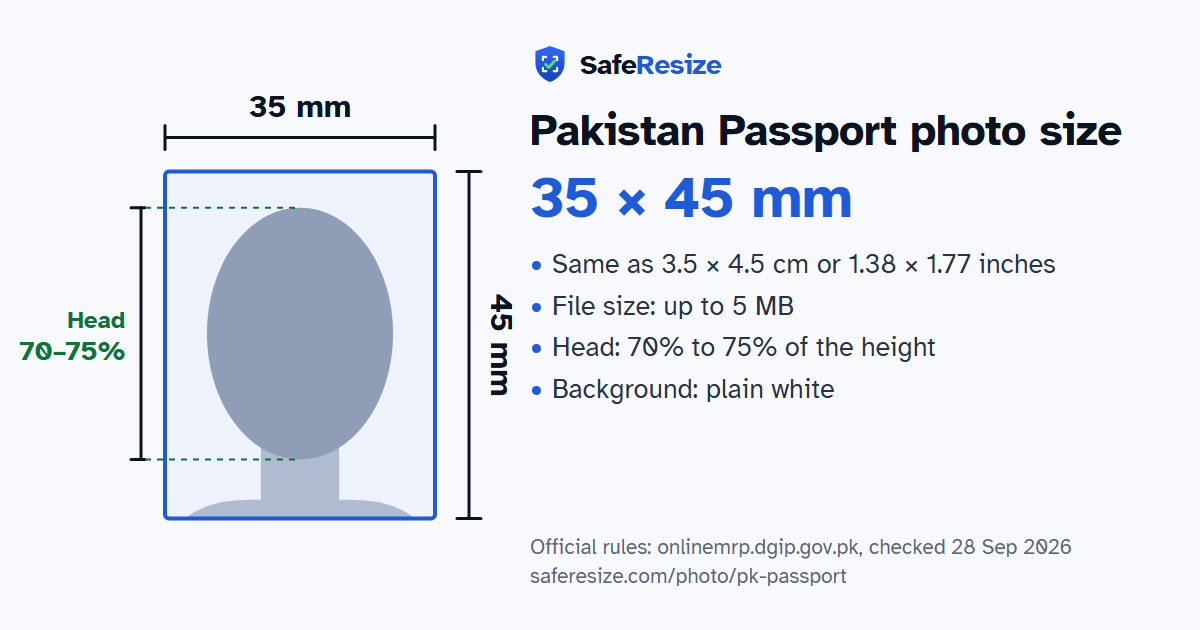
The Pakistan Passport photo is 35 × 45 mm, uploaded as a JPEG, JPG or PNG file up to 5 MB, on a plain white background.
| Printed size | 35 × 45 mm |
|---|---|
| In other units (a conversion) | 35 × 45 mm · 3.5 × 4.5 cm · 1.38 × 1.77 in · 413 × 531 px at 300 DPI · 827 × 1063 px at 600 DPI · ratio 7:9 |
| Pixels (official rule) | Not stated; photo is 35 mm wide × 45 mm high |
| File size | Up to 5 MB |
| Background | Plain white |
| Head size | 70% to 75% of the photo height, chin to top of head |
| Source | onlinemrp.dgip.gov.pk |
| Checked | 28 Sep 2026 |
Pakistan's Directorate General of Immigration and Passports (DGI&P) runs an e-Services Portal for machine readable passports. Applicants living in Pakistan can only renew there, and collect the passport at the office they chose. Overseas Pakistanis can also request reprints for lost, damaged or exhausted passports, a first passport for a baby up to 2 years old, and changes of surname or marital status for women. You register, pay online with no refund, then upload your photograph, documents and a fingerprint form scanned at 600 DPI in grayscale. Renewal is also offered in NADRA's PakID app, where fingerprints can be verified instead.
The portal accepts files only as JPEG, JPG or PNG, up to 5 MB for the photo, 3 MB for the fingerprint form and 1 MB for each supporting document. File names may contain only letters, numbers, dashes and underscores, and low-quality scans can slow processing. You also choose a passport office, since you may be called there for an interview. In person abroad, the High Commission in London and its consulates record your photo, signature and thumb impression on the spot, by appointment only, so you bring no photographs or forms.
Sources, checked 25 Oct 2026: e-Services Portal (Directorate General of Immigration and Passports), read in the Internet Archive's copy of 8 Oct 2026, F.A.Q (DGI&P e-Services Portal), read in the Internet Archive's copy of 8 Oct 2026, Document Upload Guidelines (DGI&P e-Services Portal), read in the Internet Archive's copy of 8 Oct 2026, Machine Readable Passport (High Commission for Pakistan, London) and FAQs (High Commission for Pakistan, London).
The photo is 35 × 45 mm. The official rules do not fix a pixel size. SafeResize makes a sharp 413 × 531 pixel file that fits every other rule.
35 × 45 mm is 3.5 × 4.5 cm or 1.38 × 1.77 inches, in a 7:9 shape. Printed at 300 DPI it is 413 × 531 pixels, and at 600 DPI 827 × 1063 pixels. These are conversions of the official size, not extra rules.
Up to 5 MB. SafeResize checks the size before you download, and keeps it inside the limit whether the website counts 1 KB as 1,000 or 1,024 bytes.
Plain white. Stand in front of a plain wall with no pattern, and face a window so there are no shadows behind you. The official rules do not allow edited photos, so SafeResize does not change the background for this document: a plain wall is the way.
From the chin to the top of the head, your head should fill 70% to 75% of the photo height. The face guide in the tool shows both lines.
The official rules say: No glasses.
No. The High Commission's FAQ says you need no forms or photographs, because they are captured at your appointment. Walk-ins are not served, and you bring the first page of your immigration status and your UK Share Code.
DGI&P's upload guidelines accept .JPEG, .JPG or .PNG files, with a limit of 5 MB for the photograph. Avoid spaces, dots and symbols in the file name.
Yes, for renewal only. DGI&P's portal says inland passports are delivered to the passport office you select, and inland applicants can pay through e-Sahulat or JazzCash as well as by card.
Photo no more than 6 months old. No glasses. Neutral expression with mouth closed. No red-eye or shadows. Head covering is allowed if your face shows from chin to forehead, with both sides of the face visible. Do not edit the photo in Photoshop or similar software.
JPEG, JPG or PNG. SafeResize saves a JPG (JPEG) file.
Yes. A photo taken at home is fine if it follows the rules above. It is easier if someone else takes it for you.
No. The photo is processed inside your browser and never leaves your phone or computer.
Source: onlinemrp.dgip.gov.pk, checked 28 Sep 2026. Rules can change, so confirm on the official page before you apply.