Japan Passport Photo Size: 35 × 45 mm (600 × 730 Pixels on Mynaportal, ORRnet Abroad)
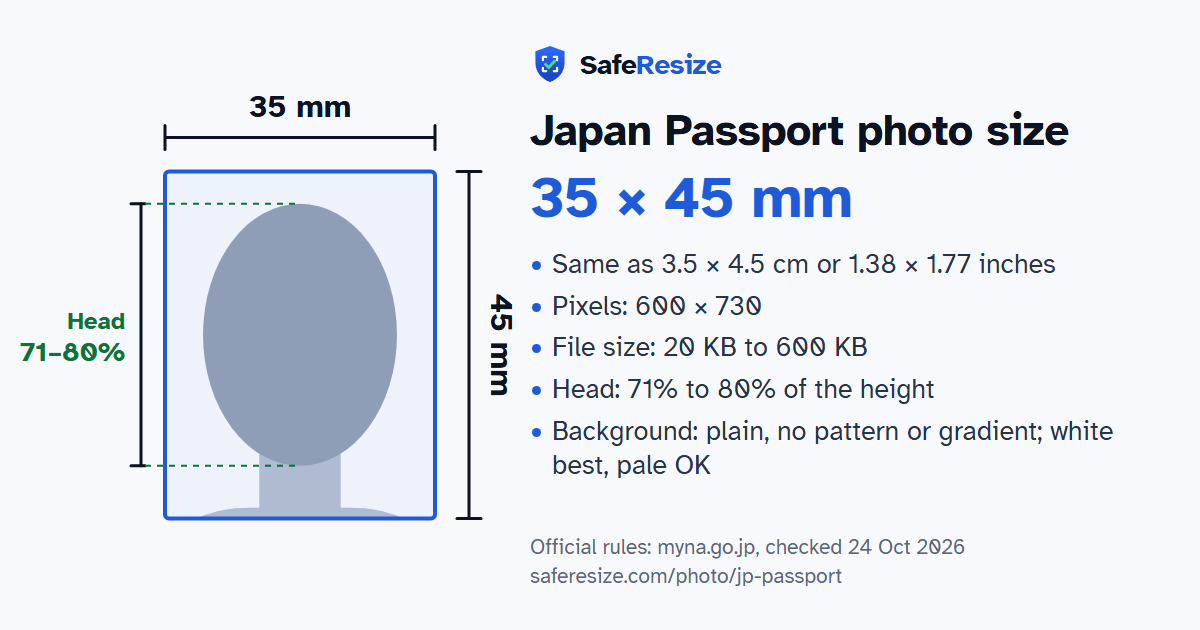
Official rules: 35 × 45 mm, 600 × 730 px, 20 KB to 600 KB, background: plain, no pattern or gradient; white best, pale OK. Source: myna.go.jp, checked 24 Oct 2026.
Official rules: 35 × 45 mm, 600 × 730 px, 20 KB to 600 KB, background: plain, no pattern or gradient; white best, pale OK. Source: myna.go.jp, checked 24 Oct 2026.
The Japan Passport photo is 35 × 45 mm, 600 × 730 pixels, uploaded as a file from 20 KB to 600 KB.
| Printed size | 35 × 45 mm |
|---|---|
| In other units (a conversion) | 35 × 45 mm · 3.5 × 4.5 cm · 1.38 × 1.77 in · 413 × 531 px at 300 DPI · 827 × 1063 px at 600 DPI · ratio 7:9 |
| Pixels (official rule) | 600 × 730 pixels (Mynaportal); overseas ORRnet: not stated |
| File size | 20 KB to 600 KB |
| Background | Plain, no pattern or gradient; white best, pale OK |
| Head size | 71% to 80% of the photo height, chin to top of head |
| Source | myna.go.jp |
| Checked | 24 Oct 2026 |
Since 24 March 2025, every Japanese prefecture accepts online applications for a first passport and for renewing one with under a year left, so you go to the office only once, to collect it. In Japan you apply through Mynaportal with your My Number Card; abroad, through ORRnet or Mynaportal. On a phone you can shoot the photo in the app, with a helper on the rear camera, or upload a saved picture. On Mynaportal, a parent or other legal representative applies for children under 15.
MOFA bases the standard on ICAO recommendations and notes that some countries verify travellers by face recognition at immigration. Only you appear, facing forward, photographed within 6 months of applying. Keep hair, masks, glasses, false eyelashes and their shadows out of the zone around your eyes. A photo without glasses is recommended; tinted lenses, reflections and frames across the eyes are unsuitable. Cloth over the head is allowed for religious or medical reasons if the outline of the face shows. Enlarged eyes, skin whitening, retouched moles, mirrored images and coloured or circle contact lenses are ruled out. A baby who cannot sit may lie on a white sheet, shot from directly above.
Sources, checked 24 Oct 2026: Mynaportal passport photo specifications, FAQ 8043 (Digital Agency, in Japanese), Passport application, operating manual (Mynaportal, in Japanese), Photo and signature images for online applications (MOFA, 28 Aug 2026, in Japanese), Applying online from Japan: FAQ (MOFA, 28 Aug 2026, in Japanese), Applying online from abroad: FAQ (MOFA, 28 Aug 2026, in Japanese), Passport photo standards (MOFA, 3 Mar 2025, in Japanese), Notice on passport photos (MOFA Passport Division, March 2025, PDF in Japanese) and Changes to the passport: the 2025 passport (MOFA, 17 Jan 2025, in Japanese).
The photo is 35 × 45 mm. Official pixel rule: 600 × 730 pixels (Mynaportal); overseas ORRnet: not stated. SafeResize makes a 600 × 730 pixel file that meets it.
35 × 45 mm is 3.5 × 4.5 cm or 1.38 × 1.77 inches, in a 7:9 shape. Printed at 300 DPI it is 413 × 531 pixels, and at 600 DPI 827 × 1063 pixels. These are conversions of the official size, not extra rules. For the upload, the official pixel rule is: 600 × 730 pixels (Mynaportal); overseas ORRnet: not stated.
Between 20 KB and 600 KB. SafeResize checks the size before you download, and keeps it inside the limit whether the website counts 1 KB as 1,000 or 1,024 bytes.
Plain, no pattern or gradient; white best, pale OK. Stand in front of a plain wall with no pattern, and face a window so there are no shadows behind you. The official rules do not allow edited photos, so SafeResize does not change the background for this document: a plain wall is the way.
From the chin to the top of the head, your head should fill 71% to 80% of the photo height. The face guide in the tool shows both lines.
The official rules say: Best without glasses; no tinted lenses, glare or frames over the eyes.
Mynaportal's FAQ gives the online photo as a JPG of 600 × 730 pixels, up to 600 KB, and warns that its width-to-height ratio differs from the 35 × 45 mm paper photo. MOFA adds that Mynaportal compresses a file over the limit, while ORRnet, used abroad, takes JPG, JPEG, BMP or PNG files of 20 KB to 2 MB.
MOFA's online application FAQ says you can upload an image saved on your device instead. You may also send the photo despite the error, but you might be asked for a new one after applying. If a medical device you cannot remove shows in the photo, submit it anyway; the office will then ask for documents to check your situation.
No. You cannot replace submitted data yourself, and you cannot view your photo again after applying. If the examiners decide the photo must be replaced, a correction request reaches you on Mynaportal, or on ORRnet if you applied there from abroad.
For a child under 15, a parent or other legal representative logs in to Mynaportal with their own My Number Card, reads the child's card and applies on the child's behalf. Children aged 15 to 17 may also apply themselves, uploading a consent form from a legal representative on Mynaportal.
Taken within 6 months, facing front, no hat (a cloth head covering for religious or medical reasons is allowed if the outline of the face shows). Top of head to chin 34 ± 2 mm on a 35 × 45 mm photo. Best without glasses; no tinted lenses, glare or frames over the eyes. No retouching or background removal. Mynaportal shrinks files over 600 KB; ORRnet (overseas) takes 20 KB to 2 MB.
JPG (Mynaportal); JPG, JPEG, BMP or PNG (ORRnet overseas). SafeResize saves a JPG (JPEG) file.
Yes. A photo taken at home is fine if it follows the rules above. It is easier if someone else takes it for you.
No. The photo is processed inside your browser and never leaves your phone or computer.
Source: myna.go.jp, checked 24 Oct 2026. Rules can change, so confirm on the official page before you apply.