Peru Tourist Visa Photo Size: 35 × 43 mm, 35 × 45 mm or 2 × 2 Inches, by Consulate
Official rules: differs by consulate, background: white. Source: gob.pe, checked 28 Sep 2026.
Official rules: differs by consulate, background: white. Source: gob.pe, checked 28 Sep 2026.
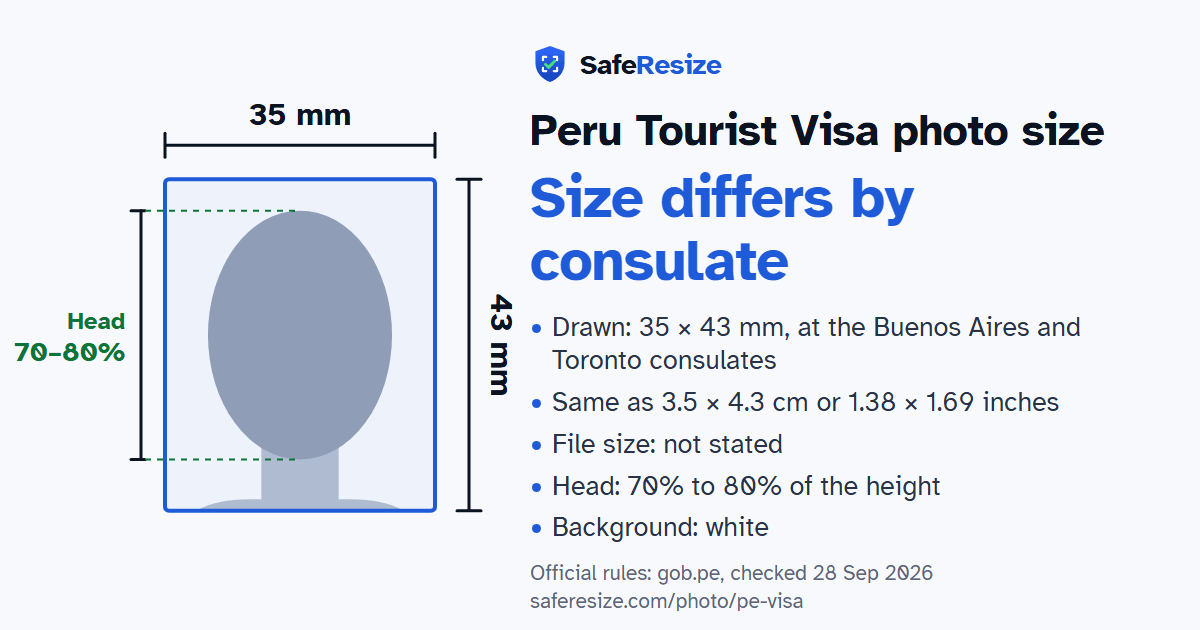
The Peru Tourist Visa photo size differs by consulate; use a white background.
| Printed size | Not one size: it differs by consulate |
|---|---|
| In other units (a conversion) | At the Buenos Aires and Toronto consulates: 35 × 43 mm · 3.5 × 4.3 cm · 1.38 × 1.69 in · 413 × 508 px at 300 DPI · 827 × 1016 px at 600 DPI · ratio 35:43 |
| Pixels (official rule) | Not stated; size differs by consulate |
| File size | Not stated in the official rules |
| Background | White |
| Head size | 70% to 80% of the photo height, chin to top of head |
| Source | gob.pe |
| Checked | 28 Sep 2026 |
Peru's tourist visa is for foreigners whose nationality needs one; citizens of some Latin American and European countries are exempt. Most consulates listed on gob.pe take the request online through the e-SAMI platform. You register, start a new request, attach your documents and the receipt for the consular fee, and the result arrives by email. The consul judges each case and may call you for an interview, and the fee is kept even if the visa is denied.
There is no single photo size, because each consulate writes its own list. Buenos Aires wants a printed colour photo of 35 × 43 mm on white, framed to mid-chest, with the face filling 70%, no glasses, no teeth showing and no head covering unless religious. Mexico City and Milan ask for 3.5 × 4.5 cm, Washington DC for 2 × 2 inches, Tokyo for 4 × 4.5 cm and Rio de Janeiro for 3 × 4 cm. Paris takes a JPG, London a 16 KB digital photo. Sydney refuses pictures taken with a mobile phone.
Sources, checked 22 Oct 2026: Apply for a tourist visa: Consulate General in Buenos Aires (gob.pe, in Spanish), Apply for a tourist visa: each consulate's requirements (gob.pe, in Spanish), Apply for a tourist visa: Embassy of Peru in India (gob.pe) and Visa requirements and exemptions for ordinary passports (Ministry of Foreign Affairs of Peru, in Spanish).
The size differs by consulate. At the Buenos Aires and Toronto consulates, it is 35 × 43 mm. The official rules do not fix a pixel size. SafeResize makes a sharp 413 × 508 pixel file that fits every other rule.
The size differs by consulate. At the Buenos Aires and Toronto consulates, the size is 35 × 43 mm, which is 3.5 × 4.3 cm or 1.38 × 1.69 inches, in a 35:43 shape. Printed at 300 DPI it is 413 × 508 pixels, and at 600 DPI 827 × 1016 pixels. Check the official page you apply through for its size.
The official rules do not state a file size. SafeResize shows the size of your file before you download it, so you can compare it with what the application screen asks for.
White. Stand in front of a plain wall with no pattern, and face a window so there are no shadows behind you. The official rules do not allow edited photos, so SafeResize does not change the background for this document: a plain wall is the way.
From the chin to the top of the head, your head should fill 70% to 80% of the photo height. The face guide in the tool shows both lines.
The official rules say: No glasses, no head covering unless religious.
The Embassy of Peru in New Delhi asks for three recent colour photos of 4.3 × 3.5 cm with a white background, the face covering 70% to 80% of each. You hand in your file in person at the Embassy, with a copy of your Aadhaar card. Nationals of Bangladesh, Nepal and Sri Lanka applying there also bring a police clearance certificate.
Not for tourism. Peru's Foreign Ministry says Indian citizens with a valid ordinary passport can enter without a tourist visa if they hold a visa of the US, Canada, the UK, Australia or a Schengen country valid for at least six months, or permanent residence in one of those countries. The same rule applies to Chinese citizens.
It depends on the consulate. Most gob.pe pages have you attach your documents on the e-SAMI platform, yet Buenos Aires asks for a printed photo, Paris for a JPG and London for a 16 KB digital photo. Embassies that take files in person, such as New Delhi, list the photos among the papers you hand in.
Recent colour photo, facing forward, neutral expression with no teeth showing, framed to mid-chest, face about 70% of the photo (Buenos Aires consulate). No glasses, no head covering unless religious. No shadows, stains, piercings or retouching.
JPG (Paris consulate); online upload limits not published. SafeResize saves a JPG (JPEG) file.
Yes. A photo taken at home is fine if it follows the rules above. It is easier if someone else takes it for you.
No. The photo is processed inside your browser and never leaves your phone or computer.
Please note: Photo size differs by consulate (35 × 43 mm in Buenos Aires and Toronto, 35 × 45 mm in Mexico City, 2 × 2 inch in Washington DC), so check your consulate's page before you apply.
Source: gob.pe, checked 28 Sep 2026. Rules can change, so confirm on the official page before you apply.